This episode of Wellness Wednesday with hosts Beth Gustin, LPC, and Robin Ennis, LCSW, CPC, explores emergency preparedness for natural disasters, with a focus on considerations for blind and low vision individuals. With recent fires in California and extreme cold weather across the U.S., the hosts emphasize the importance of having a plan in place before disaster strikes.
Key topics covered include:
• Essential emergency supplies: Medications, non-perishable food, extra clothing, ID documents, and pet supplies (for service animals).
• Mobility and carrying emergency items: Strategies for packing necessities while using a cane, guide dog, or other mobility aids.
• Communication plans: Keeping emergency contact numbers handy, knowing how to identify first responders, and having a backup power source for your phone.
• Emergency planning at home and work: Identifying escape routes, knowing how to reach help quickly, and coordinating with neighbors or family for support.
• Emotional impact: Managing anxiety during emergencies and coping with survivor’s guilt if others are more severely affected.
• Being a resource to others: The value of calmness and preparedness, as blind and low vision individuals often develop strong planning skills out of necessity.
The episode encourages listeners to evaluate their current emergency plans, discuss preparedness with loved ones, and share their experiences and questions with the Wellness Wednesday team.
Safety starts at home! Experts who have dedicated their lives to protecting children share the secrets to protecting your home and stopping child abductions and crimes in the home before they happen.
Presented with limited commercial interruption thanks to Lifelock. Join now and save up to 40% your first year. Call1-800-LifeLock and use promo code NANCY or go to LifeLock.com/NANCY for 40% off. Terms apply.
In Lesson #1, Safe In Your Own Home, Nancy Grace sits down with Klaas Kids founder Marc Klaas to discuss the night his daughter Polly was abducted from her home. What went wrong and what can be learned from Polly’s story? Following the emotional interview, a panel of experts analyze cases of child abduction, missing people, and crimes in the home and share the secrets to protecting your home and stopping crime before it happens.
Valentine’s Day is often seen as a celebration of romantic love, but what if love starts from within? In this Wellness Wednesday episode, Beth and Robin explore the foundation of love—self-love. Without it, we risk settling for less, struggling with boundaries, and feeling unworthy. Self-love isn’t about grand gestures; it’s in the small acts of care—enjoying a morning coffee, setting boundaries, or acknowledging our worth. Whether single or in a relationship, self-love shapes how we give and receive love. So, this Valentine’s Day, ask yourself: Do I truly love and respect myself? If not, where can I start
Beth and Robin revisit their most awkward, cringe-worthy, or downright baffling moments—the ones that weren’t funny at all back then. But hindsight (and a good sense of humor) turn those memories into laughable lessons. Discover how finding the funny side of life’s little mishaps can boost your well-being and lighten your load. Because let’s face it, laughter really is the best therapy (and cheaper than weekly sessions)! 🙂
This special holiday episode of the Wellness Wednesday series on the Blind Abilities Podcast is a heartfelt, lighthearted reflection on the holiday season and the approaching new year. Hosts Beth Gustin and Robin Ennis explore the joys and challenges of the festive season, sharing personal stories, traditions, and self-care tips. Beth’s enthusiasm shines as she discusses her love for holiday music and baking, while Robin fondly recalls family memories, including humorous moments with Santa’s cookies. They also acknowledge the importance of honoring loved ones who are no longer present, offering creative suggestions to celebrate their memory.
The conversation transitions into thoughts about the new year, with Robin sharing her milestone of being halfway through her doctoral program and encouraging listeners to set meaningful resolutions or themes for the year ahead.
The episode encapsulates the spirit of togetherness, celebration, and reflection, leaving listeners with a sense of hope and inspiration for the holidays and beyond
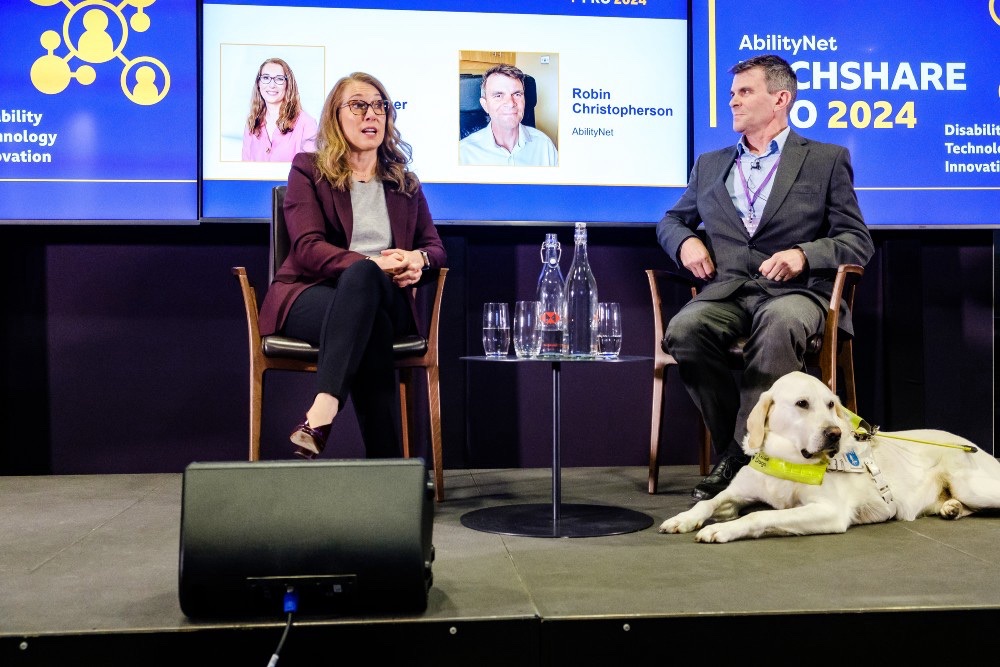
Robin Christopherson and guide dog, plus Sarah Herrlinger of Apple, on stage at TechShare Pro
Artificial intelligence (AI) is transforming many aspects of technology, particularly when it comes to accessibility. For both disabled users and developers creating accessible software, AI is proving to be a game-changer.
From real-time transcription services to tools for automated code compliance, the potential for AI in accessibility is vast and growing.
Here’s how AI is making strides in this domain, supported by practical examples.
Empowering people with disabilities through AI
AI-powered tools are becoming essential for disabled individuals by helping bridge gaps in everyday activities and communication. Here are a few examples:
Be My AI: Building on the popular Be My Eyes app, Be My AI leverages generative AI to interpret images and provide detailed contextual information. For example, a visually impaired person can photograph ingredients and ask the AI what dishes they could prepare.
Seeing AI by Microsoft: This app uses a smartphone camera to read text, identify objects, and recognize handwriting, aiding blind users in navigating their surroundings and tasks independently.
Ava and HeardThat: Apps like these transcribe conversations in real time, using advanced speech recognition models. HeardThat, in particular, isolates voices from background noise, a boon for those with hearing impairments.
AI-Powered Hearing Aids: Devices such as the Orka Two dynamically adjust settings to optimize sound clarity, prioritizing voices over ambient noise.
Goblin Tools: An AI-powered to-do list that breaks complex tasks into manageable steps, helping users with executive dysfunction stay organised.
Google’s Project Relate: Designed for individuals with non-standard speech patterns, this tool converts their speech into comprehensible text or spoken responses.
There’s no doubt that AI is unrivalled in assisting people with disabilities in their daily lives, but it’s also important that the apps and websites they need to use are accessible and inclusive.
Learn more about AI
Assisting developers in accessibility
AI is not only aiding end-users but also empowering developers to create more inclusive software and ensure compliance with accessibility standards. Key applications include:
1. Automating accessibility testing
Tools like Google’s Lighthouse and axe by Deque Systems: Automated testing suites use AI to scan for WCAG (Web Content Accessibility Guidelines) compliance, identifying common errors like poor colour contrast or missing alt text. Other common elements such as JavaScript, however, currently remain outside the abilities for AI to assess for accessibility.
2. Code generation and refinement
GitHub Copilot: This AI tool assists developers by generating code snippets, including accessible components. While it streamlines coding, developers must verify its outputs for accessibility compliance since AI can still make errors.
3. Creating personas for testing
AI has begun to be used to simulate user personas, predicting potential barriers for individuals with specific disabilities. For instance, it can model the experience of someone with low vision or limited mobility and highlight potential areas of concern.
These tools help reduce the time and effort required to identify accessibility flaws, enabling a more inclusive development lifecycle.
Challenges and ethical considerations with AI
Despite its potential, AI in accessibility comes with challenges:
Accuracy and Trust: AI models like ChatGPT sometimes confidently produce incorrect outputs, underscoring the need for human oversight – especially where the user in question isn’t able to verify the data themselves due to their disability.
Data Privacy: Using AI often involves processing user data, raising concerns about security and consent.
Ethical Testing: Simulating disabilities raises questions about whether AI can truly replicate lived experiences without oversimplifying or misrepresenting them.
The road ahead
Discussions from TechShare Pro 2024 included that AI’s capabilities are evolving rapidly, promising even more innovative solutions for accessibility. Tools are becoming better at recognising nuanced user needs, from generating more contextually aware responses to creating fully accessible digital experiences.
For developers, AI offers a path to more efficiently integrate accessibility into every stage of the design and testing process, ultimately resulting in technology that works for everyone.
By continuing to address ethical considerations and leveraging AI responsibly, we can ensure that it serves as a powerful ally in building a more inclusive digital world.
In Episode 44 of Wellness Wednesday, hosts Beth Gustin, LPC, and Robin Ennis, LCSW, CPC, bridge the gap between communities we navigate daily. They dive deep into the art of self-advocacy, exploring how personal experiences can transform feelings of isolation into moments of connection and growth. Join them as they unravel how we can bring our unique worlds into harmony, fostering understanding and belonging one journey at a time.
The Envision glasses are already a game-changer, helping users identify text, objects, and scenes in real-time. But imagine if these innovative glasses could do even more! Here are five ideas for features that could take accessibility to the next level, making everyday tasks simpler and more enjoyable. 1. Recognize Stuff Around You Imagine this: you’re at home or out at a coffee shop, and with a simple glance, your Envision glasses can identify objects around you—like your phone, keys, or a drink on the table. The glasses could give you spoken feedback on what’s nearby, like “phone at 12 o’clock” or “keys to your left,” making it far easier to locate important items. Why it’d be great: This feature could save a lot of time and hassle, especially when you’re searching for small things like keys or a wallet that can easily get misplaced. It’d be like having a personal assistant that’s always ready to help you find what you need. 2. Recognize People with Names Imagine this: The Envision glasses already detect when there’s a person in front of you, but they could take it a step further. If the glasses could remember names, it’d be possible for them to announce, “Anna is nearby” instead of just saying, “Person in front of you.” This would make social gatherings or navigating public spaces more familiar and welcoming. Why it’d be great: For those of us who interact with friends, family, or colleagues frequently, this feature would help us know who’s around and avoid those “who’s that?” moments. It’d create a more personal, interactive experience with people we care about. 3. Warn About Obstacles When Walking Imagine this: While you’re out walking, the Envision glasses could alert you to potential obstacles in your path, such as steps, curbs, or objects. With voice alerts like “step down ahead” or “curb to the right,” you could have more confidence in knowing where to step or when to be cautious. Why it’d be great: Whether you’re on a busy sidewalk or in a dimly lit room, knowing what’s around you in real-time would give you greater freedom and safety. This would be especially helpful for navigating new places without always relying on a cane or guide. 4. Control Smart Home Devices Imagine this: You walk into a room and simply say, “Turn on the lights” or “Is the front door locked?” and your Envision glasses could control smart home devices without the need for your phone. By integrating with smart home systems, the glasses could act as a hands-free, voice-activated assistant for controlling everything from lights to security. Why it’d be great: Not needing to pull out your phone to control devices would simplify daily tasks. This feature could give you more independence at home, especially in situations where reaching for your phone might be inconvenient. 5. Help with Public Transport Imagine this: You’re heading out for an appointment and need to know when the next bus or train is arriving. The Envision glasses could tell you not only when your bus is due but also where to find the nearest stop. With live information on public transport, you’d have a smoother, more predictable travel experience. Why it’d be great: Public transportation can be a challenge for anyone, but especially for those who are visually impaired. This feature could help you travel with greater independence, knowing exactly where to go and when, without needing to ask for directions or check a smartphone. Wrapping Up With these features, the Envision glasses could truly redefine independence and accessibility. Whether it’s spotting items around you, recognizing familiar faces, navigating obstacles, controlling home devices, or even helping with public transport, each feature would add incredible value. Envision is already a leader in assistive technology, but with additions like these, it could become an all-in-one tool for navigating daily life with confidence and ease.
In Episode 42 of Wellness Wednesday, hosts Beth Gustin, LPC, and Robin Ennis, LCSW, CPC, take a look at being overwhelmed. What it is, what might cause it, and some coping strategies on how to deal with it. And like they always mention, how to be more in tuned with yourself.
In Episode 40 of Wellness Wednesday, hosts Beth Gustin, LPC, and Robin Ennis, LCSW, CPC, are joined by Blind Abilities own Jeff Thompson to talk about a subject that came up pre-show. Anxiety and Ageing. How it looks and how we feel about it. Everyone has a timeline and society seems to have expectations, so how do we handle change, when time is the ticking factor.



You must be logged in to post a comment.